WecoinPay Register & Login – WecoinPay App Download Guide (India)

Download the WecoinPay app for Android, register with your mobile number and OTP, log in, and buy or sell tokens directly via UPI. No deposit is required to get started.
Join Telegram Channel| Details | Information |
|---|---|
| App Name | WecoinPay |
| Platform Type | P2P Token Trading & Wallet App |
| Earning Model | Trading commissions & referral rewards (results vary, not guaranteed) |
| Referral Commission | 1% Lifetime + Milestone Bonuses (per app terms) |
| Minimum Withdrawal | ₹100 – ₹200 |
| Login Method | Mobile OTP / Secure Password |
| Website | wecoinpay.net |
| Payment Mode | Direct UPI (P2P – No Middleman) |
| Supported Devices | Android 5.0 and above |
| Registration | Mobile Number + OTP (Free) |
What is WecoinPay?
WecoinPay is a peer-to-peer (P2P) token trading and digital wallet application built for Android users across India. The platform brings together buyers and sellers of digital tokens, enabling direct transactions between them. Every payment flows straight from one user to another through UPI, with the platform facilitating the order match and collecting a commission only after a trade is successfully completed.
Getting started requires no deposit. Create an account with your mobile number, set a password, complete OTP verification, and you can begin trading on the very same day.
All settlements happen through UPI, and the referral program allows users to earn commissions whenever someone they referred makes a purchase. For more about the people behind this guide, visit the About WecoinPay page.
Why Do People Choose WecoinPay?
The appeal of WecoinPay lies in its simplicity. Payments travel directly between users, there is no demanding KYC process, no initial deposit requirement, and no complicated trading interface to figure out.
- Zero upfront investment: Begin trading tokens without committing any money at the start
- Direct UPI settlement: Funds move straight between buyer and seller — the platform holds nothing
- Referral income: Earn a 1% lifetime commission on every purchase made by users you refer (per app terms)
- Always-on support: In-app customer assistance is available around the clock
- Trader community: A dedicated Telegram group where members exchange tips and platform updates
- User-held funds: WecoinPay acts purely as a matching service — your money stays in your hands
What is P2P Trading on WecoinPay?
P2P stands for peer-to-peer — a model where two individuals trade directly with each other rather than through a central entity. WecoinPay connects you to the right buyer or seller; everything else happens between you and them.
- How P2P works: You deal face-to-face (digitally) with another user. WecoinPay identifies the match — the transaction itself is entirely between the two parties.
- What are tokens? Tokens are tradable digital units within the app. Like any market asset, their value shifts according to demand and availability.
- A trade in practice: A seller lists tokens at their chosen price. A buyer agrees and pays the seller's UPI ID directly. Once the seller confirms receipt, tokens transfer instantly.
- Risks to understand: Token values can move up or down, and both sides must act in good faith. Before your first trade, read the User Safety Guide thoroughly.
Most first-time users complete their initial trade within minutes of completing registration.
How to Download and Install WecoinPay – Step by Step
Installing WecoinPay on any Android device takes roughly two minutes. Work through the steps below in order:
- Verify compatibility: WecoinPay runs on Android 5.0 (Lollipop) and later. Ensure at least 50MB of free storage is available.
- Open the official site: Navigate to wecoinpay.net in your phone's browser
- Tap Download: Hit the Download button on this page to fetch the latest WecoinPay APK
- Allow installation from unknown sources: In Settings > Security (or Apps), enable "Install Unknown Apps" for your browser
- Install the APK: Open the downloaded file, tap Install, and wait for it to finish
- Confirm authenticity: Check that the installed app name and icon display "WecoinPay" before proceeding
- Register: Launch the app and create your account using your mobile number and OTP
Installation problems? Clear storage space, re-enable Unknown Sources for the right app, or re-download the file and retry.
iPhone users: WecoinPay is presently Android-only. Any iOS release announcement will appear on the official Telegram channel first.
WecoinPay Register – How to Create Your Account
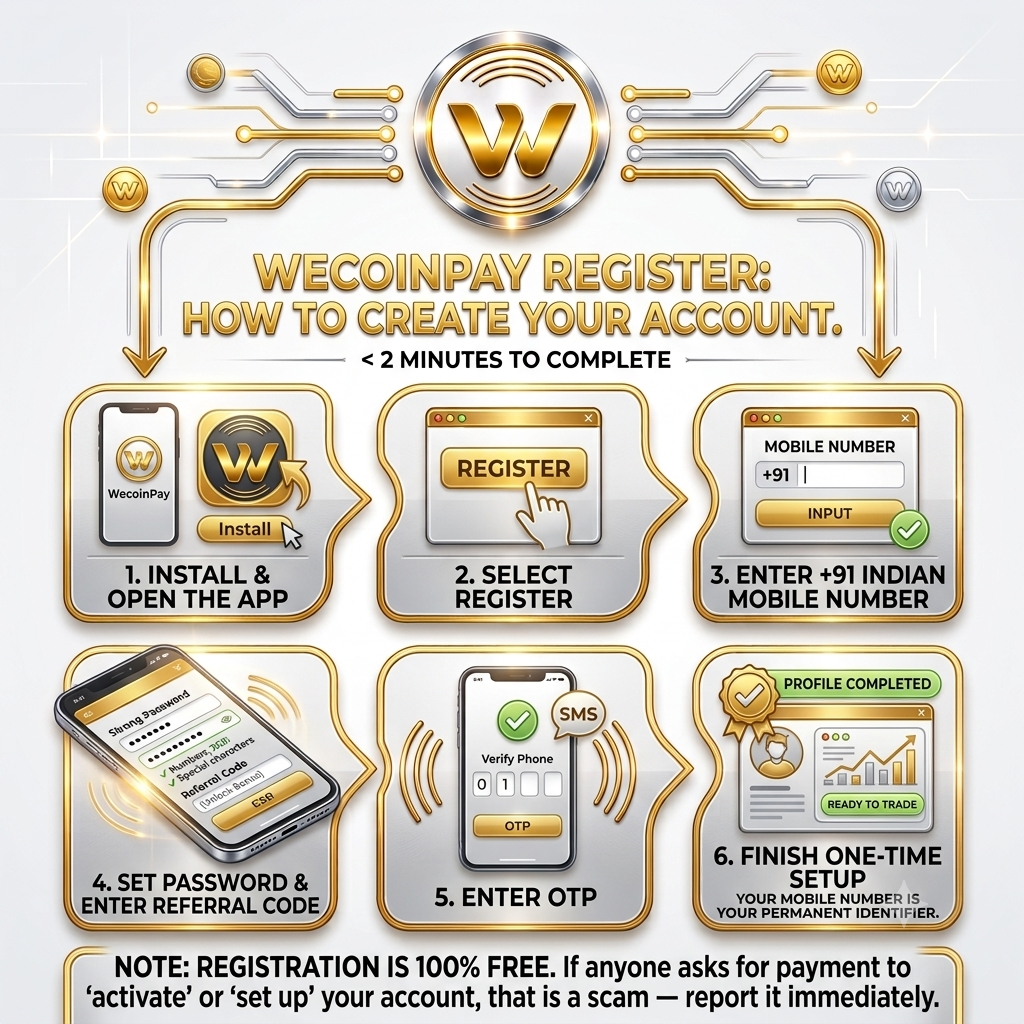
Account creation is entirely free and wraps up in under two minutes. Here is the process:
- Install the WecoinPay app and open it
- Select Register on the opening screen
- Type in your +91 Indian mobile number
- Set a strong password — combine uppercase, numbers and special characters
- If you have a referral code, enter it now to unlock the joining bonus
- Enter the OTP delivered to your phone
- Finish the one-time profile setup and you are ready to trade
Your mobile number is your permanent WecoinPay identifier — keep it handy for every login. If something goes wrong during sign-up, check the troubleshooting section below or reach out through in-app support.
WecoinPay Login – How to Sign In with OTP & Password
Signing back in takes seconds. Open WecoinPay, enter your registered mobile number, then authenticate via the OTP sent to your phone or the password you chose at registration. Your dashboard will display live buy and sell offers alongside your current wallet balance.
- Open the WecoinPay app on your device
- Enter the mobile number you registered with (+91 India)
- Authenticate using OTP or your saved password
- Enter your referral code if applicable (to claim a bonus)
- Land on the dashboard and start browsing trading opportunities
How to Buy Tokens on WecoinPay
Purchasing tokens is a clean, fast process that typically completes in under five minutes:
- Log in and head to the Buy section in the main menu
- Browse the list of sellers and pick a rate that works for you
- Enter the quantity of tokens and the total purchase amount
- Send payment to the seller's UPI ID shown inside the app
- Press the "I Have Paid" button to alert the seller
- Once the seller confirms receipt, tokens arrive in your wallet instantly
How to Sell Tokens on WecoinPay
Selling follows the same logic in reverse. Payment lands in your UPI account the moment the buyer sends it:
- Navigate to the Sell section inside WecoinPay
- Set your token quantity and the price you are comfortable with
- Wait for a buyer to accept your listing
- The buyer transfers payment directly to your UPI ID
- Open your bank or UPI app and confirm the funds have arrived
- Tap Confirm Payment in WecoinPay to release the tokens
- The platform's commission is deducted automatically from your proceeds
How to Verify a UPI Payment Before Releasing Tokens
Building this verification habit protects you from the majority of P2P fraud attempts. Before releasing any tokens to a buyer, complete every step:
- Check your own UPI or bank app — dismiss any screenshot a buyer sends you
- Confirm the exact amount — it must match the trade total to the last decimal
- Cross-reference the sender details — the name and UPI ID must align with the buyer's app profile
- Look for a "Success" status — a "Pending" result means the money has not cleared
- Only after all checks pass — tap Confirm Payment inside WecoinPay
Payment screenshots are trivially easy to edit. Your bank records are not. If anything raises doubt, file an in-app appeal immediately and hold the tokens. Additional fraud prevention guidance is in the User Safety Guide.
How to Withdraw Earnings from WecoinPay
Withdrawing is straightforward. The majority of requests complete within 24 to 48 hours:
- Go to the Withdraw section from the app menu
- Enter the withdrawal amount (minimum ₹100 – ₹200)
- Choose your UPI-linked bank account
- Review everything carefully and confirm the request
- Monitor progress from the Withdrawal History screen
- Funds land directly in your bank account once the request processes
How the WecoinPay Earning Model Works
WecoinPay offers three distinct income streams, and most active participants tap into at least two simultaneously:
- Trading profits: Acquire tokens at a rate you are happy with, then sell when market conditions shift in your favour. A platform commission of 2% to 6% applies per completed trade as per current app terms.
- Referral commissions: The platform rewards a 1% lifetime commission on every purchase made by users in your referral network, plus bonus payouts at key milestone levels.
- Volume-based incentives: High-activity traders can unlock additional monthly commission tiers based on their trading volume, subject to app terms.
Important: these figures represent potential earnings, not guarantees. Actual income depends on how actively you trade, market behaviour and the strength of your referral network.
WecoinPay Referral Program – Complete Details
The referral system lets you generate passive income from your network activity. Share your personal code, and every time a referred user makes a purchase you receive a 1% lifetime commission as stated in the app. Reach the following milestones for additional rewards:
| Referral Milestone | Commission | Bonus Reward |
|---|---|---|
| Each New Signup | ₹25 Instant | — |
| 1 to 10 Referrals | 1% Lifetime on Purchases | — |
| 10 Referrals | 1% Lifetime | 500 Bonus Tokens |
| 25 Referrals | 1% Lifetime | 1,500 Bonus Tokens |
| 50 Referrals | 1% Lifetime | 3,500 Bonus Tokens |
| 100 Referrals | 1% Lifetime | 7,000 Bonus Tokens + ₹500 Cash |
Locate your referral code inside the app under Referral > My Code. Distribute it through WhatsApp, Telegram, Instagram or anywhere your contacts are active.
WecoinPay Fees – What Does Trading Actually Cost?
Understanding the full fee picture before your first trade prevents unpleasant surprises. Here is how costs break down under current app terms:
- Account registration: Completely free — no activation or setup charge
- Initial deposit: None required — WecoinPay allows trading from day one without any upfront funds
- Per-trade commission: 2% to 6%, deducted automatically from the seller's proceeds when a trade completes
- Withdrawal fee: No platform charge — any applicable fees are set and collected by your bank or UPI provider
- Referral payouts: Credited directly to your wallet balance with no deduction
Because WecoinPay is a P2P platform, it never holds user money. The commission is only collected from the seller's side after a trade is confirmed. Full terms are detailed in the Terms & Conditions.
WecoinPay – Pros and Cons
| Pros | Cons |
|---|---|
| No initial investment needed to start trading | Not registered with RBI or SEBI |
| P2P design means the platform never holds user funds | Available as APK only — not listed on Google Play Store |
| All payments move directly between buyers and sellers via UPI | Phishing risk from impostor sites — only use wecoinpay.net |
| Active Telegram community for updates and trading discussion | Sellers must manually verify each payment before releasing tokens |
| Structured in-app appeal process for trade disputes | No public phone number for support (deliberate anti-fraud measure) |
| Instant onboarding with no deposit gate | Income is performance-dependent — no guarantees |
WecoinPay vs Other Trading Platforms
Comparing your options is a smart move before committing to any platform. Here is a snapshot of how WecoinPay stacks up against three well-known alternatives in India:
| Platform | Model | KYC & Deposit | Best For |
|---|---|---|---|
| WecoinPay | P2P via UPI | No KYC, Zero deposit | Direct user-to-user token trading |
| CoinDCX | Centralised exchange | KYC + deposit required | Regulated crypto purchases |
| WazirX | Exchange + P2P option | KYC + deposit required | Wide selection of coin pairs |
| CoinSwitch | Investment aggregator | KYC + deposit required | Beginner-friendly investing |
What sets WecoinPay apart: Centralised platforms operate closed order books and require verified identity documents plus deposits before trading. WecoinPay is purely peer-to-peer — no KYC, no deposit, and payments go directly between traders via UPI. Each model serves a different need; review every platform's terms before making a decision.
Points to Consider Before You Trade on WecoinPay
Evaluating any platform is a personal decision that requires your own research. To help, here are the key factors to investigate before committing:
- Download source: Only wecoinpay.net hosts the genuine app. Lookalike sites with similar URLs exist and are not affiliated with WecoinPay.
- Regulatory position: WecoinPay is not registered with RBI or SEBI, and the tokens it facilitates are not SEBI-regulated financial instruments.
- Payment mechanics: This is a fully P2P model — money flows directly between users via UPI, and the platform never handles it.
- Support access: Assistance is available exclusively through in-app chat; there is no public telephone number.
- Financial risk: Token prices fluctuate, and income is never fixed or assured.
Advice: Start with amounts you can comfortably lose and trade small until you have a solid grasp of how the platform operates.
Regulatory Status – What You Need to Know
WecoinPay is not registered with the Reserve Bank of India (RBI) or the Securities and Exchange Board of India (SEBI). Payments are handled through UPI, which operates under standard Indian banking regulations. Whether token trading aligns with your personal legal and financial situation is something only you can determine.
- Unregulated: WecoinPay and its tokens fall outside RBI and SEBI jurisdiction
- No custody model: The platform does not pool or hold user funds — all transactions are direct UPI transfers
- UPI framework: Payment processing adheres to standard UPI rules governed by participating banks
- Personal due diligence: Consulting a financial or legal professional before trading is advisable if you have concerns
- Informational only: Nothing on this page constitutes legal or financial advice
Begin with small amounts and increase exposure only once you fully understand how the platform functions. See the complete Disclaimer and Terms & Conditions for further detail.
WecoinPay Security – Essential Safety Practices

On a P2P platform, your security largely depends on the habits you build. Adopt these consistently and your risk profile drops significantly:
- Personally verify every payment: Check your own bank app before releasing tokens — no exceptions, ever.
- Never share credentials: WecoinPay support will never ask for your OTP, password or UPI PIN. Treat any such request as fraud.
- Maintain a strong password: Use a combination of character types and refresh it every couple of months.
- Download exclusively from wecoinpay.net: Counterfeit apps circulate under the WecoinPay name — always verify the source and icon.
- Use in-app dispute resolution: When a trade goes sideways, raise a formal appeal through the app — never try to settle matters outside the platform.
- Keep your app current: Every new version includes security improvements alongside feature updates.
The comprehensive User Safety Guide contains additional protection strategies.
Common Scams Using the WecoinPay Name – And How to Avoid Them
WecoinPay's visibility makes it a target for impersonators. These are the scam types reported most frequently and the steps to avoid falling victim:
- Fabricated support numbers: WecoinPay operates with zero public phone numbers by design. Every support number posted online is a fraud.
- Fake download portals: Sites mimicking WecoinPay push malware APKs. The only verified source is wecoinpay.net.
- Impersonator Telegram channels: Fraudsters clone the WecoinPay branding in Telegram and solicit deposits. Only follow the channel linked directly on this page.
- Upfront fee demands: WecoinPay will never charge you to "activate withdrawals", "raise limits" or "verify your account". Every such request is a scam.
- Doctored payment evidence: Buyers sometimes present edited screenshots claiming payment was sent. Always check your own bank statement.
Spotted an impostor site or group? Report it through the in-app support system so the broader community can be warned. Full scam-avoidance guidance is available on the User Safety page.
Risks & Responsible Trading on WecoinPay
Token trading carries genuine financial risk — any platform or person claiming otherwise is misleading you. Keep these realities in mind before and during your time on WecoinPay:
- Value volatility: Token prices move up and down. Commit only funds you would be comfortable losing entirely.
- Regulatory gaps: WecoinPay is not regulated by RBI or SEBI, and its tokens are not classified as securities.
- No income guarantee: What you earn is entirely a product of your trading frequency, market conditions and referral network size.
- Impersonation threats: Fake WecoinPay sites and Telegram groups are active. Always return to wecoinpay.net and the channel linked on this page.
- Manual payment checks: In P2P, you are responsible for confirming each payment. A missed check can result in an unresolvable dispute.
Key Features of the WecoinPay App
- No starting capital required: Access P2P token trading from day one without depositing anything
- Genuine P2P structure: Every trade runs directly between two users — WecoinPay only handles the matching
- Integrated UPI payments: All transactions settle via UPI with no intermediary wallet layer
- Lifetime referral earnings: A 1% commission on every purchase your referred users make, indefinitely
- Quick withdrawals: Most payout requests are processed and delivered within 24 to 48 hours
- 24/7 live support: In-app chat connects you to the team at any hour for trading help or dispute assistance
- Lightweight and accessible: Runs smoothly on Android 5.0 and later — no premium hardware needed
- Structured appeal system: When trades hit problems, the built-in dispute process provides a clear resolution path
WecoinPay – App Version History & Updates
The platform is continuously improved with new capabilities and security enhancements. Always run the latest version downloaded directly from the official website.
| Version | Release Date | Key Updates |
|---|---|---|
| v2.7.0 | 05 August 2026 | Faster withdrawal processing, improved UPI status sync, security hardening |
| v2.6.0 | 15 July 2026 | Faster trade matching, improved appeal flow, UPI settlement status tracking |
| v2.5.0 | 20 June 2026 | New referral dashboard, milestone progress bar, in-app announcements |
| v2.4.0 | 25 May 2026 | OTP delivery fixes, wallet view improvements, security patch |
Common Issues & Fixes – WecoinPay Login and App Problems
Before escalating any problem to support, try these self-service fixes:
- OTP not arriving: Check your network signal, turn off any active VPN, restart the phone, then request a new OTP
- Login not working: Clear app cache, use the Forgot Password option to reset credentials, or reinstall the app
- App crashing: You are likely on an outdated build — download and install the latest version from wecoinpay.net
- Sluggish performance: Low device storage often causes slowdowns — free up space and relaunch
- Payment stuck: Contact the other party from the order screen directly; if unresolved, raise an in-app appeal
- Withdrawal delayed: Confirm your bank account details are accurate, then file an in-app appeal if the wait exceeds 48 hours
How to Contact WecoinPay Customer Support
All support runs through the in-app live chat, which operates 24 hours a day. WecoinPay deliberately maintains no public phone number — this policy prevents fraudsters from impersonating the support team over calls. Any number you find online claiming to be WecoinPay support is fake.
For queries specifically about this website, use our Contact Us page.
Contact WecoinPay SupportWecoinPay – What Users Commonly Report
The observations below are drawn from general community feedback and updated periodically. These are user-reported experiences, not verified or guaranteed outcomes:
- Payment speed: A significant portion of users report that trades and withdrawal requests settle within one to two days
- Onboarding ease: New users frequently note how straightforward the registration process and first trade turn out to be
- Referral reliability: Active referrers report receiving their commissions consistently and in a timely manner
- Dispute resolution: Users express appreciation for the structured in-app appeal system and its responsiveness
Frequently Asked Questions
01 Is the WecoinPay app available on iPhone?
Not at present. WecoinPay is built exclusively for Android 5.0 and above. Follow the official Telegram channel for any future iOS announcement.
02 What is the minimum withdrawal amount on WecoinPay?
The minimum withdrawal sits between ₹100 and ₹200, depending on the token type and payment method selected.
03 Can I run more than one WecoinPay account?
No. A single account per person and per mobile number is strictly enforced. Running multiple accounts violates platform policy and can lead to a permanent ban.
04 What should I do if a payment stays pending or a trade breaks down?
Start by messaging the other party directly from the order page. If the matter is unresolved after 24 hours, file an in-app appeal and the support team will step in to investigate.
05 Is there a public customer care number for WecoinPay?
No — and intentionally so. All support is delivered through the in-app live chat, available 24/7. Any phone number you see online claiming WecoinPay affiliation is a scam.
06 Where do I find my personal referral code?
Open the app and go to Referral > My Code. Your unique code and a shareable link are displayed right there.
07 My OTP is not being delivered — what should I do?
Check your mobile signal, disable any VPN, restart your phone and clear the app cache, then request a fresh OTP. If the problem persists, contact in-app support directly. Additional fixes are in the troubleshooting section.